
⚡ Key takeaways
- A job pinned to one model fails outright when that model disappears. It never touches your fallback chain.
- Unpin agent jobs and set a fallback provider, so a dead model costs you one switch, not five silent weeks.
- Keep the job prompt short. Attach a skill to the job instead of pasting it into the prompt.
- Jobs that only run a script need no model at all: make them script-only.
Hermes is good at proposing its own automation. You mention that you keep checking EV prices or new releases, and it offers to turn that into a scheduled job. You say “do it,” and that should be the end of it: the whole point of Hermes cron jobs is that you stop doing and looking things up yourself. Then, weeks later, you notice nothing has arrived for a while. This is what broke in my setup, why, and the changes that make the jobs keep running on their own.
If you have not set up a scheduled task yet, start with Scheduling tasks in Hermes. This article picks up where that one ends.
The jobs I was running
I run six jobs, most of them proposed by Hermes during normal chats. Four matter here: a watch radar that scores new movies and series against my taste every Sunday, an EV price monitor that compares electric car prices with a benchmark file each month, a daily vault reindex for my Obsidian notes, and a weekly skills sync check across profiles.
Three different things went wrong, and only one of them announced itself.
Symptom 1: “the model this job uses was not found”
The free model my jobs used became a paid model, and every job that depended on it failed. Under the hood the provider returned an HTTP 404 saying the model was no longer free. On Telegram, the alert read: “Cron ‘watch-radar wekelijks’ failed: the model this job uses was not found at the AI model service.”
By then the watch radar had failed five runs in a row, and the EV monitor once. The alert also suggests a fix: pin another model with hermes cron edit <job> --model <name>. That works until the next model disappears, and it is exactly what caused symptom 3.
Symptom 2: the job succeeded but did nothing
The EV monitor showed a successful run, yet nothing new landed in its tracking file and nothing reached me. Its reply was [SILENT]. That marker is meant for “nothing changed, don’t message me”: a final response containing it suppresses delivery, and Hermes only saves the output under ~/.hermes/cron/output/.
The cause sat in the prompt. When Hermes created the job, it pasted my entire product research skill into it: 68,397 characters of instructions for what should be a few steps. The Hermes docs set no size limit, so this is my reading rather than a documented rule: with that much context, the model lost track of the actual task and took the quiet way out.
A skill attached to the job loads at run time instead, so the prompt only needs the task.
Symptom 3: the fallback never kicked in
A job pinned to its own model ignores your fallback chain. My jobs were pinned to a free preview model. The Hermes docs are explicit: a pinned job does not fall back, so if its model fails, the run fails.
Unpinned jobs inherit the fallback chain, which makes unpinning the one change that matters most.
Fix your Hermes cron jobs, step by step
The easiest route is the chat: describe the fix and let Hermes do it. To edit a job yourself, run hermes dashboard, open Cron in the sidebar and click the pencil next to the job, as Figure 1 shows. The Desktop app can pause and trigger jobs, but not edit them. The terminal route comes last.

Step 1: Unpin every agent job
Tell Hermes. What I asked, per job: “Analyze cron job [name] and find out why it fails. Run it on the standard main model, with the fallback model if that fails. Don’t pin any models.”
In the dashboard: pencil on the job, open Advanced fields, and set Provider and Model to Default. The job card then shows default. Figure 2 shows the form.
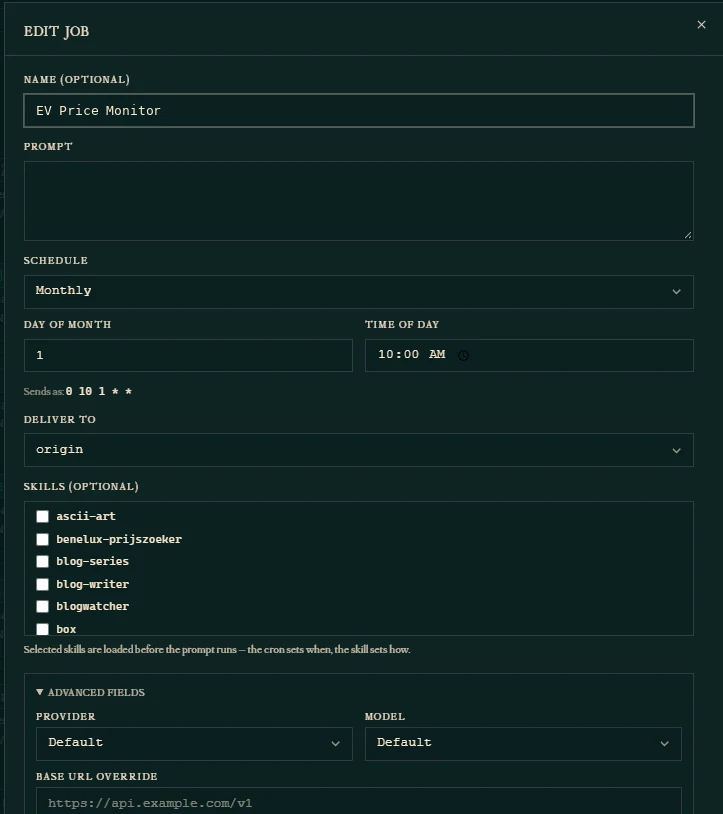
From the terminal: hermes cron edit <job_id> --unpin.
An unpinned job runs on your main model, which you set in Hermes Desktop under Settings → Model → Main model.
Step 2: Add a fallback model
In Hermes Desktop: go to Settings → Model → Fallback models and click Add fallback. Pick a provider and a model; Hermes tries the entries in order when the default model fails. With several profiles, the Applies to chips choose which one you edit. Mine is DeepSeek through Command Code; Figure 3 shows the page.
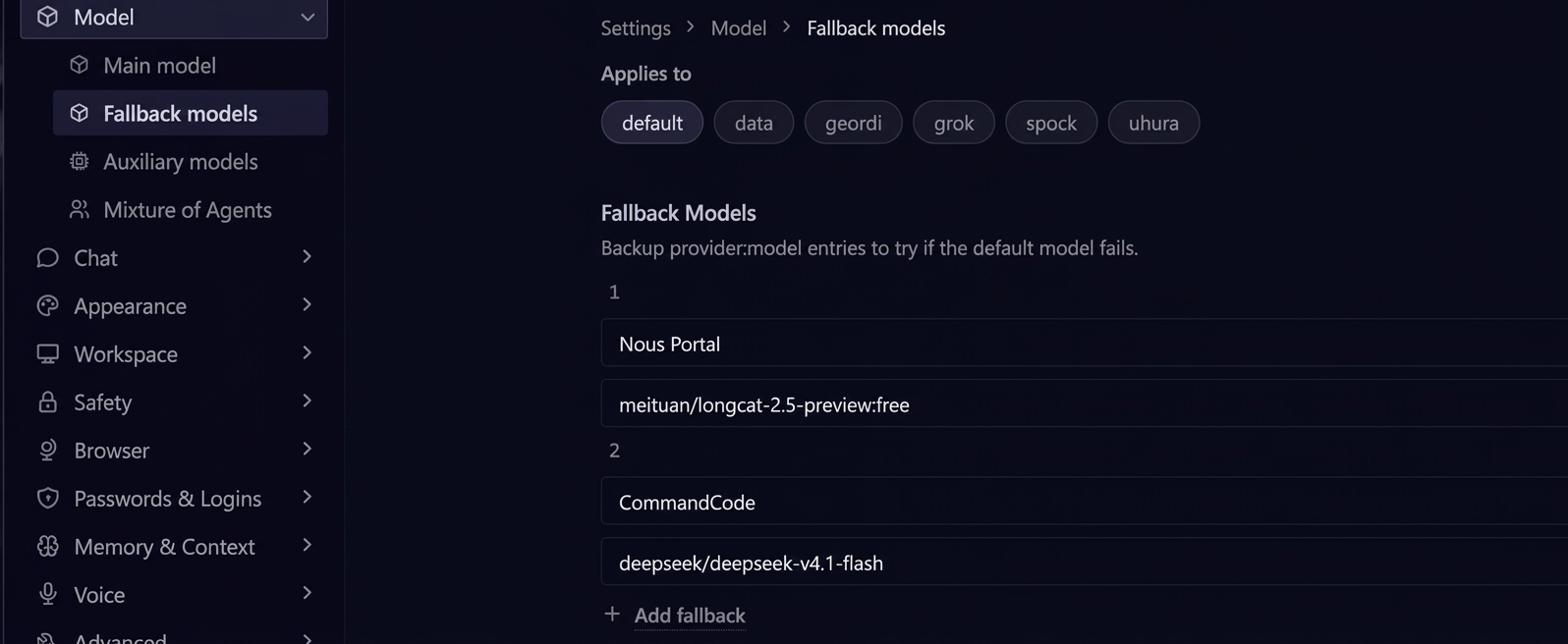
From the terminal: hermes fallback add, then hermes fallback list to check.
A 404 like mine switches to the fallback immediately, without retries, and so do auth errors. Rate limits and server errors switch after the retries run out.
Step 3: Make sure failures reach you
A failed run is always delivered, even when the reply contains [SILENT]. It goes to the job’s delivery target, which the dashboard shows on each job card, such as origin or a Telegram chat. If it is not a channel you read, change Deliver to in the edit form. A silent success, like symptom 2, sends nothing, which is why the next step matters.
Step 4: Cut the prompt to the task
Rewrite the prompt so it says only what to do: which file to read, the steps, what to output and where. My EV monitor went from 68,397 to about 700 characters. For example: “Read ev-benchmark.json. Look up current US prices for the models listed in it. Add today’s prices to tracking.json. Reply with the three biggest changes, or [SILENT] if nothing moved more than 2%.”
Tell Hermes: “Shorten the prompt of [job] to the task only and attach the skill instead.” In the dashboard: edit the Prompt field and tick the skill under Skills; selected skills load before the prompt runs. From the terminal: hermes cron edit <job_id> --prompt "..." --add-skill <name>.
Step 5: Make script jobs script-only
The vault reindex and the skills sync check just run a script, so they need no model. A script-only job runs a script from ~/.hermes/scripts/ without tokens and sends its output; a crash or timeout sends an alert.
Tell Hermes: “Turn [job] into a script-only job without an agent.” From the terminal, a new job looks like this (the script name is an example):
hermes cron create "0 6 * * *" --no-agent --script vault-reindex.sh --deliver telegram --name "vault-reindex"Check that it works
Trigger one job by hand: the lightning icon on its card, in the dashboard or the Desktop app. The card’s Last time updates, and the result arrives at its delivery target. From the terminal, hermes cron doctor checks all jobs at once and exits with code 0 when nothing is left to report; hermes cron run <job_id> and hermes cron runs <job_id> trigger a job and show its history.
An honest note: my fallback is set but has not been triggered yet, so on this point I rely on the docs, not on a real failure.
Before you say “do it”
Hermes will keep proposing jobs, and that is useful. Before you agree, ask it four things:
- Is the job pinned to a model? Ask it to use the default model and the fallback.
- How long is the prompt? A few hundred characters with the task is right. Pasted skills are not.
- Does this need a model at all? If it only runs a script, make it script-only.
- Where do failures go? The answer should be a channel you read.
What’s next
With unpinned jobs and a fallback in place, the next question is cost: which model each job really needs. Model routing and cost control for your AI agent covers that.
This article is part of the Agentic AI series.

John Lock
Liked this? There's more where it came from.
Get our digest — articles worth your time, no spam, unsubscribe in one click.
Subscribe to Factnetize →