
⚡ Key takeaways
- OpenAI is showing some free users a Claim offer button: one month of ChatGPT Plus for $0 instead of $20.
- You add a card, but nothing is charged during the free month. After that it renews at $20/month unless you cancel.
- The rule: cancel at least 24 hours before the renewal date.
I found this offer by accident. I had used up my weekly Claude Pro limit, opened my free ChatGPT account to keep working, and saw a Claim offer button I had never noticed before. A month of ChatGPT Plus free, worth $20. This guide shows how to claim it, how to switch off the renewal so you never pay, and what I learned doing exactly that.
What you need
- A free ChatGPT account. Sign in at chatgpt.com. The offer only shows when you are logged in.
- A credit or debit card. It is needed to start the subscription, even at $0.
Not every account gets the offer. OpenAI’s own promotions page says some promotions are only for people who never had Plus, and the offer screen marks it as limited time.
Step 1: Find the Claim offer button
The button sits at the bottom left of the ChatGPT sidebar. Figure 1 shows what it looks like.

- Open chatgpt.com and sign in.
- Look at the bottom left of the sidebar.
- Click Claim offer.
Step 2: Claim the ChatGPT Plus free month
You now see two plans side by side: Free and Plus. Figure 2 is the screen I got in the US version.
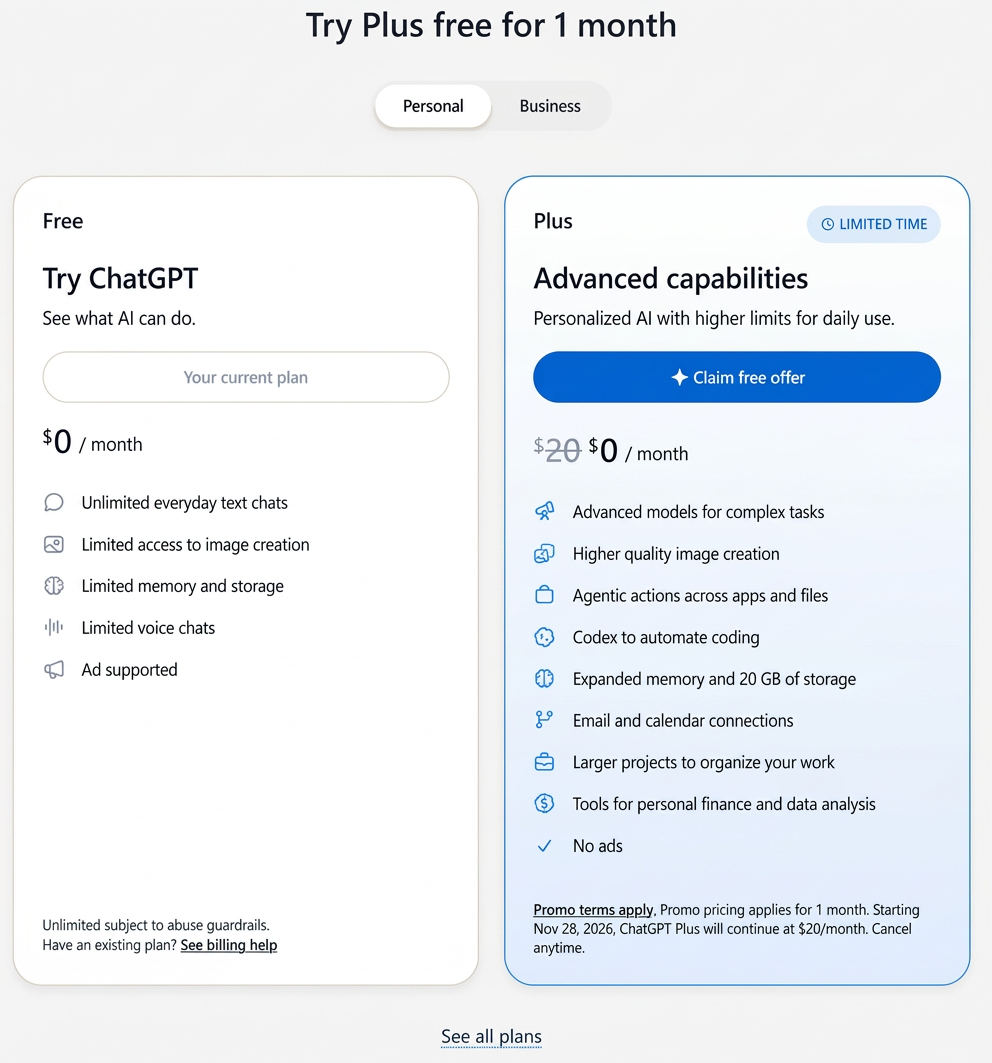
- Read the small print under the Plus plan. It names the date your paid plan starts, one month from today.
- Write that date down.
- Click Claim free offer.
- Enter your card details and confirm.
Plus is active right away. The card is the catch: the subscription renews at $20/month on its own unless you cancel, as OpenAI’s promotions page states.
Step 3: Turn off the renewal
You have two ways to do this. Both mean you pay nothing.
- Cancel later (safest for the full month). Set a reminder two days before the renewal date. OpenAI’s rule is at least 24 hours before it; a later cancel may not stop the charge.
- Cancel right away. No reminder needed, but for free promotions OpenAI says access may end immediately.
From my own use: I canceled after three days, mostly to see what would happen, and Plus kept working for the rest of the month.
To cancel on the web, follow OpenAI’s cancel instructions:
- Click your name or profile icon at the bottom left.
- Open Settings.
- Select Billing. Some accounts show Subscription here instead.
- Under Cancel plan, click Cancel and confirm.
Did you claim the offer in the iPhone or Android app? Then Apple or Google bills you, and you cancel there: on iPhone under Settings → your name → Subscriptions → ChatGPT, on Android in the Play Store under Subscriptions. Deleting your ChatGPT account does not cancel an Apple subscription.
Check that it worked
Open Settings → Billing again, or the Apple or Google subscription list. It should show that the subscription is no longer set to renew.
Bonus: use Plus in your AI agent
This is the part I liked most. Plus includes Codex, and Hermes can sign in with your ChatGPT account instead of an API key. When my Claude limit ran out, I switched Hermes over and kept working on the same tasks.
- In Hermes Desktop, open Settings → Model.
- Pick ChatGPT or Codex Subscription.
- Sign in with your ChatGPT account when Hermes asks.
From the terminal: hermes model, then the same option. The Hermes provider docs call it ChatGPT OAuth with Codex models, with no API key needed. New to agents? Start with the Agentic AI series.
Troubleshooting
I don’t see a Claim offer button
Your account may not be in the promotion; some offers are only for people who never had Plus. Check that you are signed in with the right account.
I can’t find the cancel option
You probably subscribed through the app. Cancel in Apple’s or Google’s subscription settings, not in ChatGPT.
What’s next
Use the month to test what Plus does better for your own work; if it is worth $20 to you, let it renew. For what happens to your chats in the cloud, read Local vs cloud AI: what actually stays private.
Discover more from Factnetize
Subscribe to get the latest posts sent to your email.

John Lock
Liked this? There's more where it came from.
Get our digest — articles worth your time, no spam, unsubscribe in one click.
Subscribe to Factnetize →