

⚡ Key takeaways
- Command Code can keep your prompts for up to 30 days by default — one
x-cmd-zdr: 1header switches it to zero data retention. - The header alone is not enough: auxiliary calls (title generation, goal scoring, compression) won’t read it unless you set it at the model level.
- Bot profiles don’t inherit your main config, so set ZDR in every profile you run.
- A few newer models have no ZDR upstream and fail with HTTP 422 — run them in a separate profile without the header.
By default, Command Code may retain your prompts for up to 30 days so it can “operate and protect” the service. Flip on zero data retention and those requests are processed transiently — never stored, and never used for training. This guide shows you exactly how to turn it on in Hermes Agent, where the setting silently leaks, and how to keep it strict across every bot, sub-agent, and model you run.
What zero data retention means at Command Code
Command Code’s zero data retention (ZDR) is a contract with the upstream provider: the request is handled with zero retention and no training, and the content is processed transiently and never stored. Only operational metadata — timestamps, token counts, model IDs — is kept.
Two things make ZDR worth setting explicitly. First, it is fail-closed: a ZDR request routes only to ZDR-capable upstreams, and if the model has none, it fails with HTTP 422 / cmd_zdr_no_providers instead of silently falling back to a provider that keeps data. Second, Command Code reports that around 99% of its models have ZDR-capable upstreams — but coverage changes monthly as provider agreements renew, so it is not a static guarantee.
Two nuances matter before you start. Command Code already routes most models through ZDR-capable upstreams by default and states it does not train foundation models on your prompts or source code. The header’s real job is to make that guarantee strict — ZDR or fail, no fallback. And it is not free: ZDR requests are metered at the default (non-boosted) allowance and can route to a pricier upstream at pass-through rates, so the same credits buy fewer requests.
Prerequisites
You need three things:
- Hermes Agent — a running install. If you don’t have one yet, the step-by-step guide to installing your first AI agent on Windows 11 gets you there in about 10 minutes.
- A Command Code plan with API access. The entry-level tier is aimed at using Command Code’s own agent; for API access you want the GOAT plan or the API-first Provider plan. Plan names and prices shift often, so check the live pricing page for today’s details.
- The
COMMANDCODE_API_KEYenvironment variable, exported in your shell or.envfile, pointing Hermes at the Provider API endpointhttps://api.commandcode.ai/provider/v1.
Step 1: Enable ZDR globally for the main agent
Open your main config.yaml and add the header under the Command Code provider block. Hermes attaches extra_headers to every request routed to that provider’s base URL:
providers:
  commandcode:
    extra_headers:
      x-cmd-zdr: "1"
With this in place, your main chat requests to Command Code go out with x-cmd-zdr: 1, and the provider treats them as strict zero data retention. The header is applied last — after URL and profile defaults — so it survives credential swaps and client rebuilds.
Step 2: Fix the auxiliary-call gap (the pitfall most people hit)
Here is the part that quietly defeats a provider-only setup. Auxiliary calls — context compression, session-title generation, vision and image analysis, and goal scoring — resolve their own client path and, for a custom provider, do not carry forward providers.*.extra_headers. This is a known open issue in the Hermes Agent repo (GitHub issue #88463).
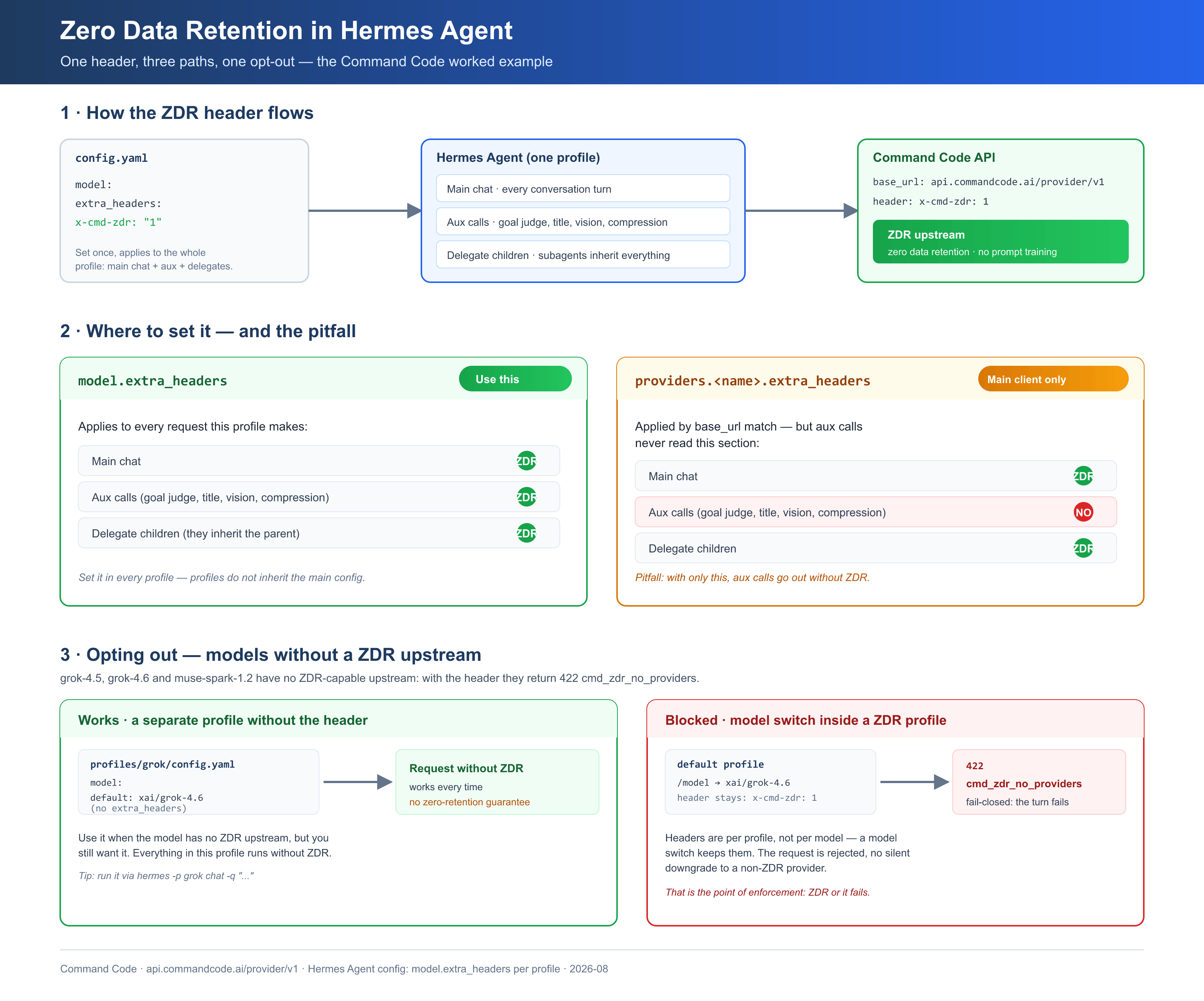
We hit exactly this on a live setup in August 2026: a goal_judge call showed up in the Command Code logs without x-cmd-zdr, because zero data retention was only set under providers.commandcode.extra_headers. The main chat had the header; the auxiliary calls did not.
The fix is to set the header at the model level, which Hermes applies to both the main client and the auxiliary clients:
model:
  extra_headers:
    x-cmd-zdr: "1"
model.default_headers works the same way and is the key most clearly documented. Either one closes the gap: main chat ✅ and auxiliary calls ✅, instead of main ✅ / auxiliary ❌.
Step 3: Set ZDR in every profile (bots)
Hermes profiles are deliberately isolated: each bot profile is its own home directory with its own config.yaml, .env, and state. Config inheritance was requested and closed as “won’t-fix” (issue #20270) — profiles do not inherit the main config.
So if you run specialist bots — say spock, uhura, geordi, and data — each one needs its own model-level header. Set it per profile with:
hermes config set model.extra_headers.x-cmd-zdr "1"
Run that inside each profile (or edit each profile’s config.yaml at C:\Users\YourUsername\AppData\Local\hermes\profiles\your-profile\config.yaml). Then confirm the header landed by checking the file shows x-cmd-zdr: "1" under model.extra_headers.
Step 4: Delegation inherits ZDR automatically
Good news for sub-agents: delegate_task children run in-process and inherit the parent’s provider, base URL, API key, and client. The header travels with the client, so a child spawned by a ZDR-enabled parent inherits zero data retention with no separate setup — there is no separate path that strips it.
One honest caveat: the header-survives-delegation behavior is verified on a live machine, not stated verbatim in the public docs. Treat it as machine-verified behavior, and confirm it in your own logs.
Step 5: Opt out for models without a ZDR upstream
A small handful of models have no ZDR-capable upstream. With the header on, those models return HTTP 422 / cmd_zdr_no_providers — Command Code’s error text is blunt: “Remove the header or pick a different model.”
On a live setup in August 2026, these returned 422 with the header on:
xai/grok-4.5xai/grok-4.6meta/muse-spark-1.2meta/muse-spark-1.2-contributor
That list is a snapshot — Command Code does not publish which models lack coverage, and it changes monthly as agreements renew (newer models like Grok 4.6 typically lag). The durable lesson is the mechanism, not the list: when you deliberately want a non-ZDR model, run it in a separate profile without the header. For example, a grok profile on xai/grok-4.6 with no ZDR header. Switching the model inside a ZDR profile does not help — the header stays on the client, and the non-ZDR model still 422s.
Best practices
- Verify in the logs. Send a request and confirm
x-cmd-zdr: 1appears on both main chat and auxiliary calls in your Command Code request logs. The logs are the only proof the header actually applied. - Expect coverage to move. ZDR coverage is renewed monthly; a model that 422s today may gain coverage next month, and vice versa.
- Budget for it. ZDR is metered at the default allowance and can route to a pricier upstream, so ZDR requests cost more credits than the same model without the flag.
- Know the escape hatch. The only way out of a 422 is to remove the header or pick a different model — so keep one non-ZDR profile handy for the models that need it.
Troubleshooting
| Problem | Fix |
|---|---|
HTTP 422 / cmd_zdr_no_providers |
The model has no ZDR upstream. Remove the header, pick a different model, or move this model to a separate profile without the header. |
No usable credentials |
COMMANDCODE_API_KEY is missing, or your plan has no API access. The entry-level tier returns this; you need a plan with API access such as GOAT or Provider. |
Auxiliary calls appear in logs without x-cmd-zdr |
You set the header under providers.* only. Add it under model.extra_headers (or model.default_headers) so auxiliary clients get it too. |
| A bot profile runs without ZDR even though the main config has it | Profiles don’t inherit the main config. Set model.extra_headers inside each profile. |
A /model switch keeps the header but still 422s |
Expected. The header stays on the client, so switching models inside a ZDR profile does not make a non-ZDR model work. |
Frequently asked questions
Does zero data retention cost extra?
Yes. ZDR requests are metered at the plan’s default allowance rather than the boosted per-model allowance, and they can route to a pricier upstream at pass-through rates. The same credits buy fewer ZDR requests.
Which models don’t support zero data retention?
Command Code does not publish the list. As a snapshot verified in August 2026, xai/grok-4.5, xai/grok-4.6, meta/muse-spark-1.2, and meta/muse-spark-1.2-contributor returned 422 with the header on. Coverage changes monthly, so test rather than assume.
Do my sub-agents get zero data retention too?
Yes. Delegate children inherit the parent’s provider, base URL, API key, and client in-process, so the header travels with them. Confirm it in your logs, since this specific behavior is machine-verified rather than stated in the public docs.
Is zero data retention the same as “private by default”?
Not quite. Command Code already routes most models through ZDR-capable upstreams by default and does not train on your prompts even without the flag. The header makes it strict and fail-closed — ZDR or fail, no silent fallback to a provider that keeps data.
What you’ve achieved
You now have strict zero data retention across your whole Hermes setup: the main agent, its auxiliary calls, every bot profile, and every delegated sub-agent. The whole thing is one header (x-cmd-zdr: 1) in two places — model.extra_headers for full coverage, providers.commandcode.extra_headers for the main agent — plus a separate profile for the few models that have no ZDR upstream.
The next step is to prove it: send a request, open your Command Code logs, and confirm the header appears on both your main chat and the auxiliary calls. That log check is the difference between “configured” and actually covered. If you’re extending a Hermes install further, the building your own agentic AI assistant series covers tools, memory, and automation next.

John Lock
Liked this? There's more where it came from.
Get our digest — articles worth your time, no spam, unsubscribe in one click.
Subscribe to Factnetize →


